K0maru Developer Console (UI) User Guide
Embedded Local Visual Debugging Dashboard & Context Governance Center for AI Coding Agents
Zero-Daemon, Single-Binary Developer Dashboard for Obsidian & LLM-Wiki.
Table of Contents
- Design Philosophy & Core Value
- Quickstart & CLI Parameters
- Header Status Monitoring & Global Actions
- Panel 1: Multi-Modal Search Debugger
- Panel 2: Long Log & State Machine Inspector
- Panel 3: Token Economics & Cache Scoreboard
- Standard Human-in-the-Loop Workflows
- Lifecycle & Graceful Shutdown
1. Design Philosophy & Core Value
When AI coding agents interact with knowledge bases via FastMCP, memory retrieval, relevance scoring, and log truncation traditionally operate inside a black box. Human developers cannot easily evaluate:
- Retrieval Quality: Why did the agent select Note A over Note B?
- Algorithmic Attribution: What individual contributions were made by BM25 lexical search, dense ONNX embeddings, and WikiLinks graph topology?
- Execution Failure Context: When an agent truncates a failing test log, what does the distilled state machine look like, and how can a developer quickly intervene?
- Quantifiable Cost Reduction: Exactly how many tokens and API dollars did context governance save?
k0maru ui visualizes these critical metrics in a sleek Developer Dark Console, strictly upholding our architectural invariants:
- Zero-Daemon: Never runs as a background service. It launches on demand and completely releases memory and port bindings upon
Ctrl+C. - Single-Static-Binary: Frontend static assets are embedded at compile time via
rust-embed. No Node.js, npm, or Python runtime required. - 100% Offline Self-Contained (Zero-CDN): Operates without external CDNs, running smoothly in air-gapped or sandboxed environments.
2. Quickstart & CLI Parameters
Basic Launch
Run directly in your terminal:
# Mount the local Markdown vault and automatically open the default browser
k0maru ui --vault ~/Documents/MyVault --open
Console output:
🚀 K0maru Dashboard active on http://127.0.0.1:3721
Opening http://127.0.0.1:3721 in default browser...
CLI Flags & Options
| Option | Flag | Default | Description |
|---|---|---|---|
--vault <PATH> | -v | Current working directory | Path to the local Markdown vault (e.g. Obsidian Vault or LLM-Wiki) |
--port <PORT> | -p | 3721 | HTTP port to bind (strictly bound to 127.0.0.1 loopback for security) |
--open | None | false | Automatically opens the web dashboard in the system default browser |
--help | -h | None | Prints command help and options |
3. Header Status Monitoring & Global Actions
The top header serves as the central control bar for real-time status monitoring and quick actions:
 Figure 1: Header status bar (Vault mount path, document counts, bilingual toggle, and one-click incremental sync)
3.1 Mount Status Badges
- Vault Path: Displays the absolute physical path of the mounted Markdown vault.
- Docs Count: Total number of indexed Markdown documents stored in SQLite cache.
- Vectors Count: Total number of documents with generated 384-dimensional dense embeddings.
- Synced Timestamp: Last recorded incremental scan timestamp (e.g.,
15:42:10).
3.2 🌐 Bilingual I18n Toggle
- Click the
🌐 中文 / ENpill button in the top right to instantly switch UI text, status cards, tooltips, and toast notifications between English and Chinese. - Zero page reload required.
- Local Persistence: User preference is stored in browser
localStorage, defaulting to your operating system or browser locale on first launch.
3.3 ⚡ One-Click Incremental Sync (Sync Vault)
- After adding or modifying notes in your Markdown vault, click "Sync Vault".
- K0maru triggers an incremental
xxh3hash comparison in the background, updating only modified documents and vectors, and presents a live toast summary.
4. Panel 1: Multi-Modal Search Debugger
Used to verify, tune, and evaluate AI agent long-term memory retrieval accuracy.
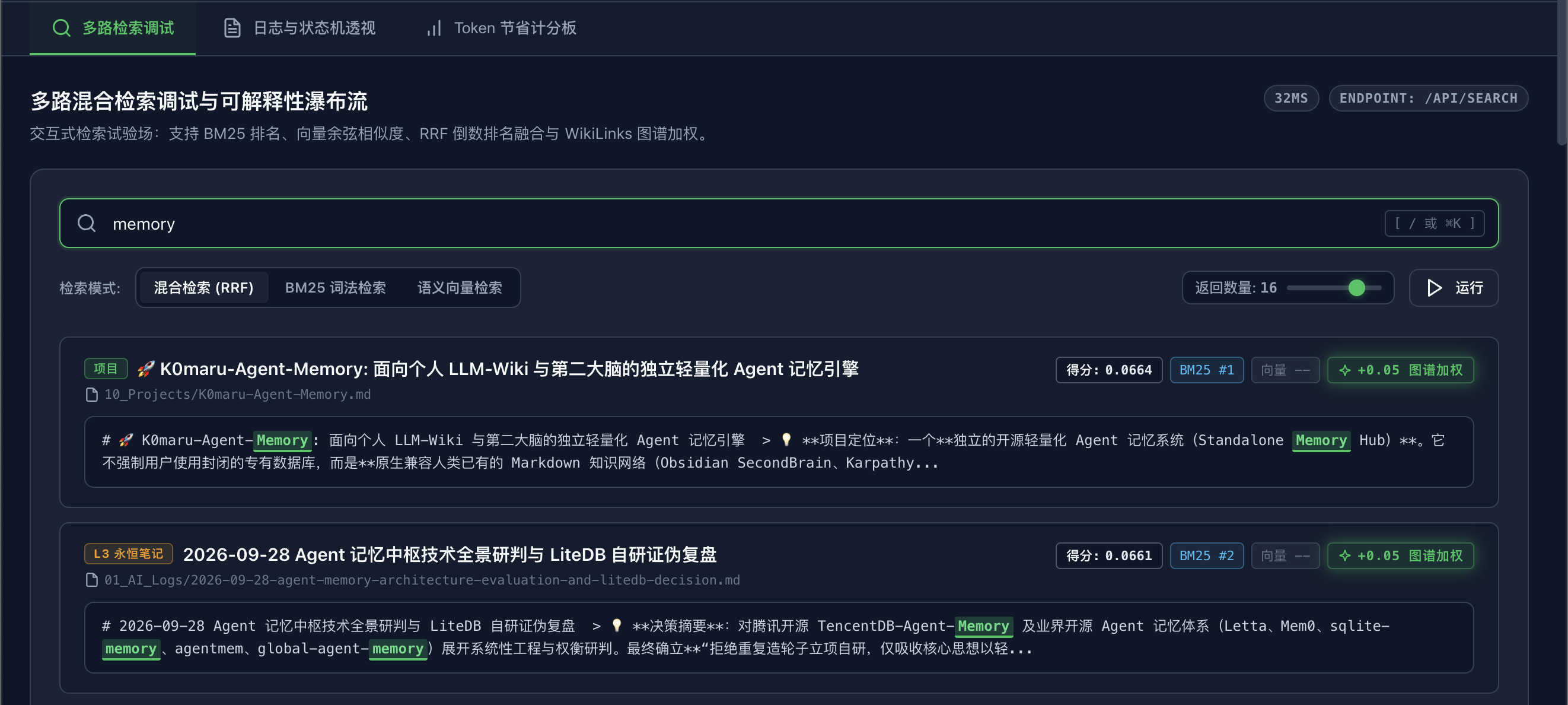 Figure 2: Search Debugger (Query input, hybrid RRF scoring waterfall, and green graph boost badge)
4.1 Global Hotkey
Press / or Cmd+K / Ctrl+K anywhere on the dashboard to focus the search bar. Press Esc to dismiss.
4.2 Tri-Modal Retrieval Strategies
- Hybrid RRF (Default & Recommended): Uses Reciprocal Rank Fusion ($k=60$) combining BM25 lexical ranking and dense vector cosine distance. Delivers exceptional recall across both exact technical terms and fuzzy semantic concepts.
- Lexical BM25: Pure SQLite FTS5 inverted index search, providing deterministic exact matching for function names, error codes, and configuration flags.
- Vector Dense: Pure 384-dimensional cosine distance retrieval powered by local CPU ONNX (
fastembed-rs), optimized for conceptual reasoning and natural language queries.
4.3 Explainability Waterfall
Each retrieved card displays fine-grained attribution metrics:
- RRF Score: Combined fusion score determining final ranking order.
- BM25 Rank: Lexical search rank position.
- Vector Rank: Dense vector semantic similarity rank position.
- ✨
+0.05 Graph BoostGreen Badge: When a candidate note shares bidirectional WikiLinks ([[OtherNote]]) with other top candidates, K0maru awards an adjacency graph boost (+0.004 to +0.05). This badge visually verifies that your bidirectional links are actively improving retrieval accuracy.
5. Panel 2: Long Log & State Machine Inspector
Designed for troubleshooting long-running task failures, inspecting truncated execution traces, and human intervention.
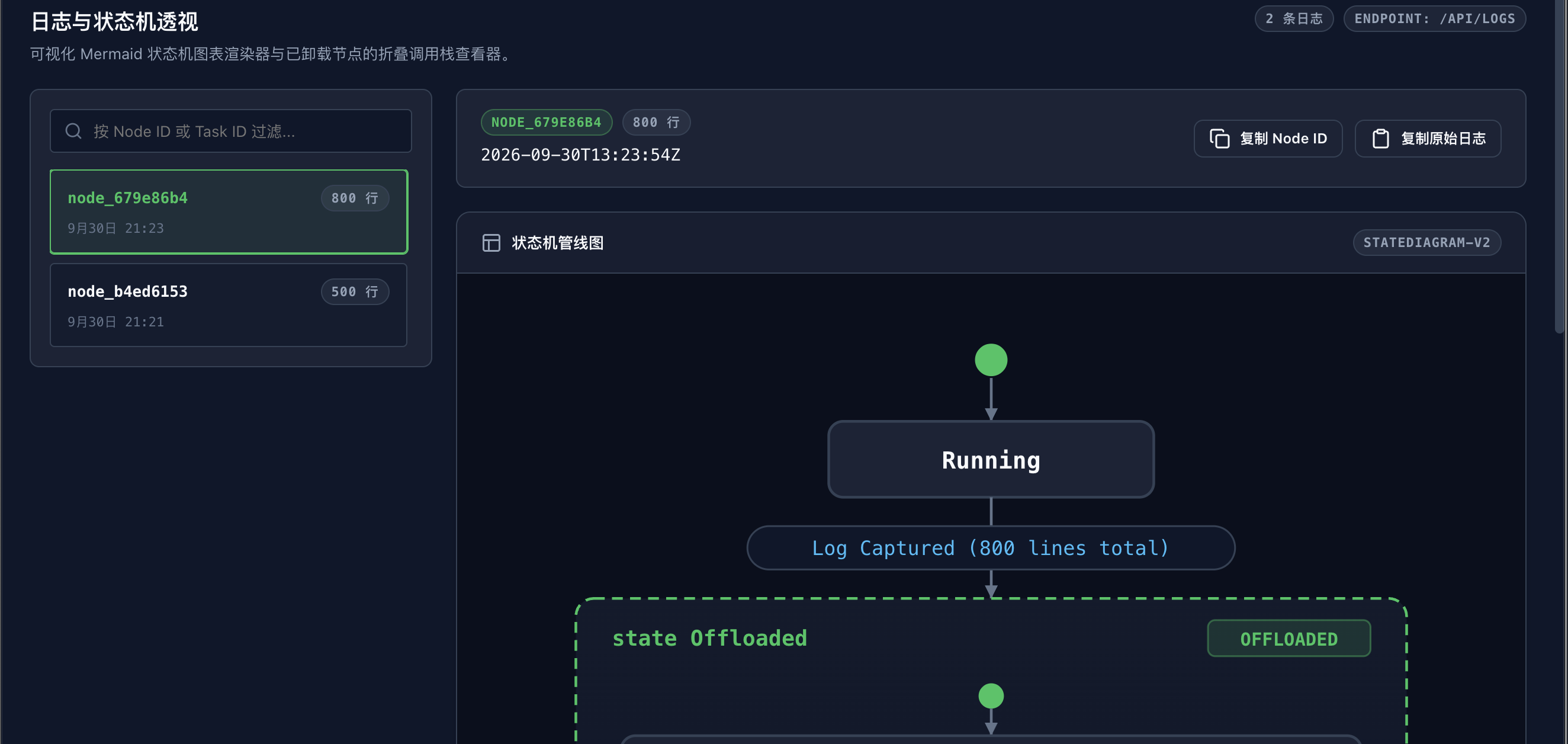 Figure 3: Log Inspector (Offline Mermaid state machine, line numbers, error highlighting, and one-click copy)
5.1 Master-Detail Layout
- Left Sidebar: Chronological listing of all truncated log nodes created by
offload_context, filterable by node ID (e.g.,node_) or task tag (e.g.,cargo-test). - Right Detail View: Full structural breakdown of the selected execution trace.
5.2 Offline Mermaid State Machine
Renders a visual execution pipeline graph completely offline, immediately indicating at which phase the task encountered an error or was truncated.
5.3 Syntax Colorization & Error Pinpointing
- Standard code editor line numbers.
- Automatically highlights lines containing
error,failed,panicked, orexceptionin red background and warnings in yellow background, pinpointing root causes across hundreds of lines of output.
5.4 One-Click Collaboration Workflow
- Copy Node ID: Copies the reference identifier to clipboard for terminal inspection via
k0maru inspect <node_id>. - Copy Raw Log: Extracts the full lossless raw stack trace ready to paste into Claude Code or Cursor for guided patching.
6. Panel 3: Token Economics & Cache Scoreboard
Used to quantify token savings and monitor underlying memory system health.
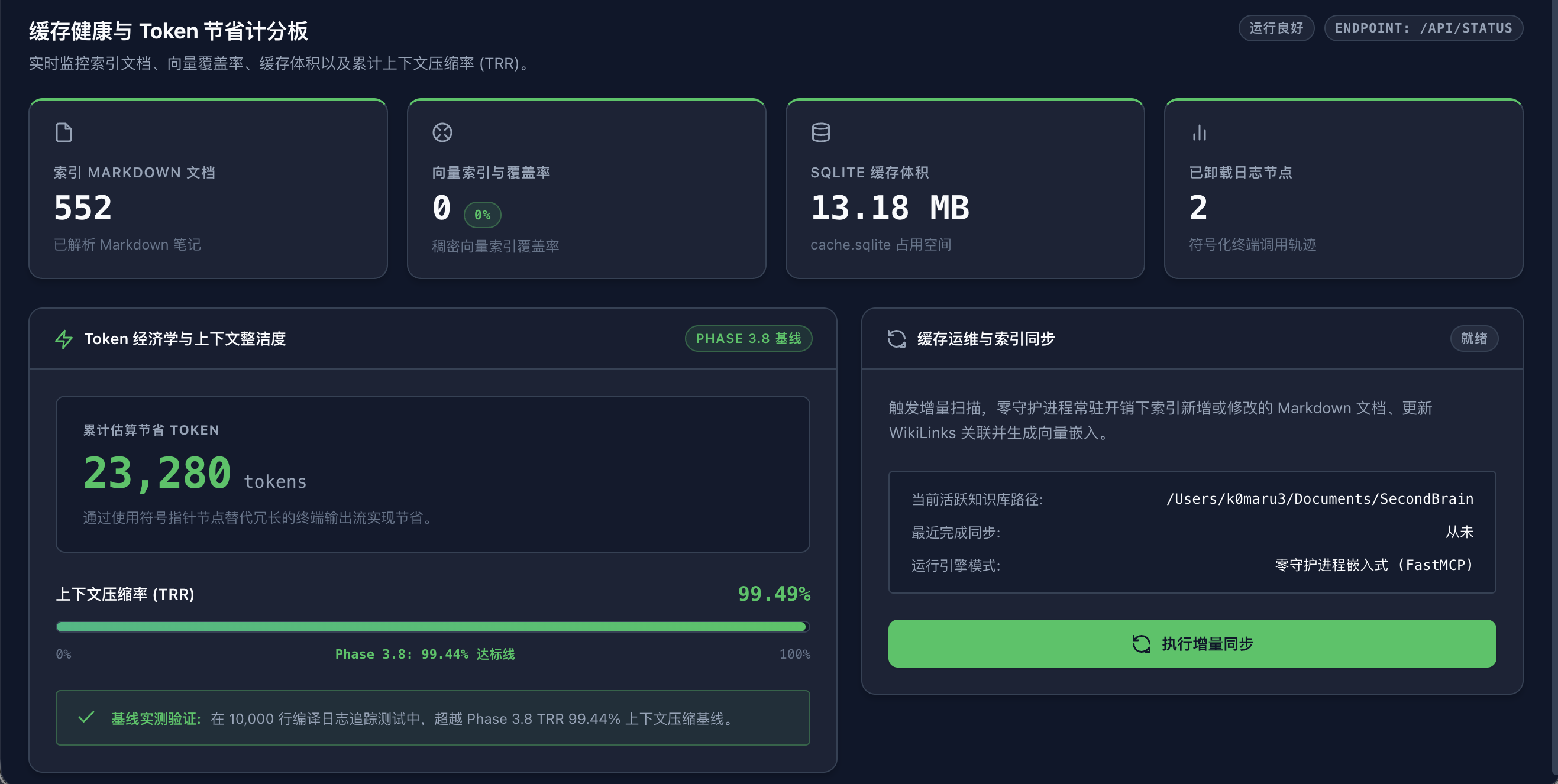 Figure 4: Cache Health & Scoreboard (Core KPI matrix, TRR context reduction ratio, and sync status)
6.1 Core Asset KPI Matrix
- Indexed Documents: Total valid Markdown notes parsed and cached in SQLite.
- Vector Coverage: Percentage of notes embedded with dense vectors (100% indicates full semantic coverage).
- SQLite Cache Size: Compact disk footprint of the transient
cache.sqlitedatabase file. - Offloaded Log Nodes: Number of voluminous terminal traces offloaded out of the agent's active context window.
6.2 Token Economics & Quantifiable ROI
- Cumulative Tokens Saved Counter: Calculated by comparing raw log character volume against distilled state machine overhead: $$\text{Tokens Saved} \approx \sum (\text{Raw Lines} \times 18) - \text{Mermaid Graph Overhead}$$
- Token Reduction Ratio (TRR): Measures the context compression achieved by log offloading (typically 98.5% to 99.6%), displayed on a visual gauge.
7. Standard Human-in-the-Loop Workflows
Scenario A: Verifying Memory Retrieval for New Notes
- Create a new architecture card in your vault:
20_Cards/distributed-deadlock-handling.md. - Launch
k0maru ui --open(or click "Sync Vault" in an already open dashboard). - In the search panel, press
/and type: "how to resolve cross-shard deadlocks". - Verify that the new note ranks at the top, and inspect its RRF score and
+0.05 Graph Boostbadge. If the graph boost is absent, add[[RelatedArchitectureCard]]WikiLinks to strengthen topological associations.
Scenario B: Rapid Debugging from 500-Line Build Failures
- The agent executes
cargo test | k0maru offload, emitting a compact state machine and returning identifiernode_7b810e12. - Open the dashboard and switch to the Log Inspector panel.
- Select
node_7b810e12in the left sidebar. - Inspect the Mermaid graph and the red-highlighted error lines (e.g., assertion failure at line 184).
- Click "Copy Raw Log" and paste it into Claude Code / Cursor: "Please inspect this assertion failure and propose a fix."
8. Lifecycle & Graceful Shutdown
- Zero Background Daemons: The dashboard web server runs exclusively during explicit user execution.
- Graceful Exit: In the terminal running
k0maru ui, press:bashConsole output:^CtextThe server immediately unbinds portShutting down K0maru Dashboard server...3721and frees all memory, leaving zero orphaned processes.